
You’re under a sink, with a client, or it’s 9 p.m., and the phone rings. An AI receptionist is software that picks up those calls for you, answers common questions, takes details and, on some plans, books the appointment. This guide explains what it actually does, what it costs at real call volumes, how to set one up without changing your number, and what can go wrong.
It’s based on each vendor’s own pricing and help pages (all checked on November 29, 2026) and on published third-party tests, not on our own testing. It’s written for US businesses: prices are in US dollars, and the legal notes refer to US rules.
The short answer
- What it is: a voice AI that answers your business line, talks with callers in plain language, and then texts or emails you a summary. Think of it as an AI assistant with a phone number (the difference between chatbots, assistants and agents is in our plain-English guide to chatbots, AI agents and automations).
- What it costs: among the nine services we priced, the cheapest published options run from free (Smith.ai’s 25-call plan, or My AI Front Desk’s limited Free plan) to $99 a month. In our worked example, a business taking about 100 calls a month would pay roughly $49 to $212.50 a month, depending on the service and how it bills. See the tables below.
- Who it suits: owners who miss calls because they’re working, after-hours callers who need an answer or a booking, and small teams who don’t want to hire for the phones.
- The main risk: it can say something wrong with total confidence, including telling a caller they’re booked when nothing was booked. You stay responsible for what it tells your customers, so test it before customers hear it.
What an AI receptionist does on a call
The details vary by service and plan, but most follow the same basic flow.
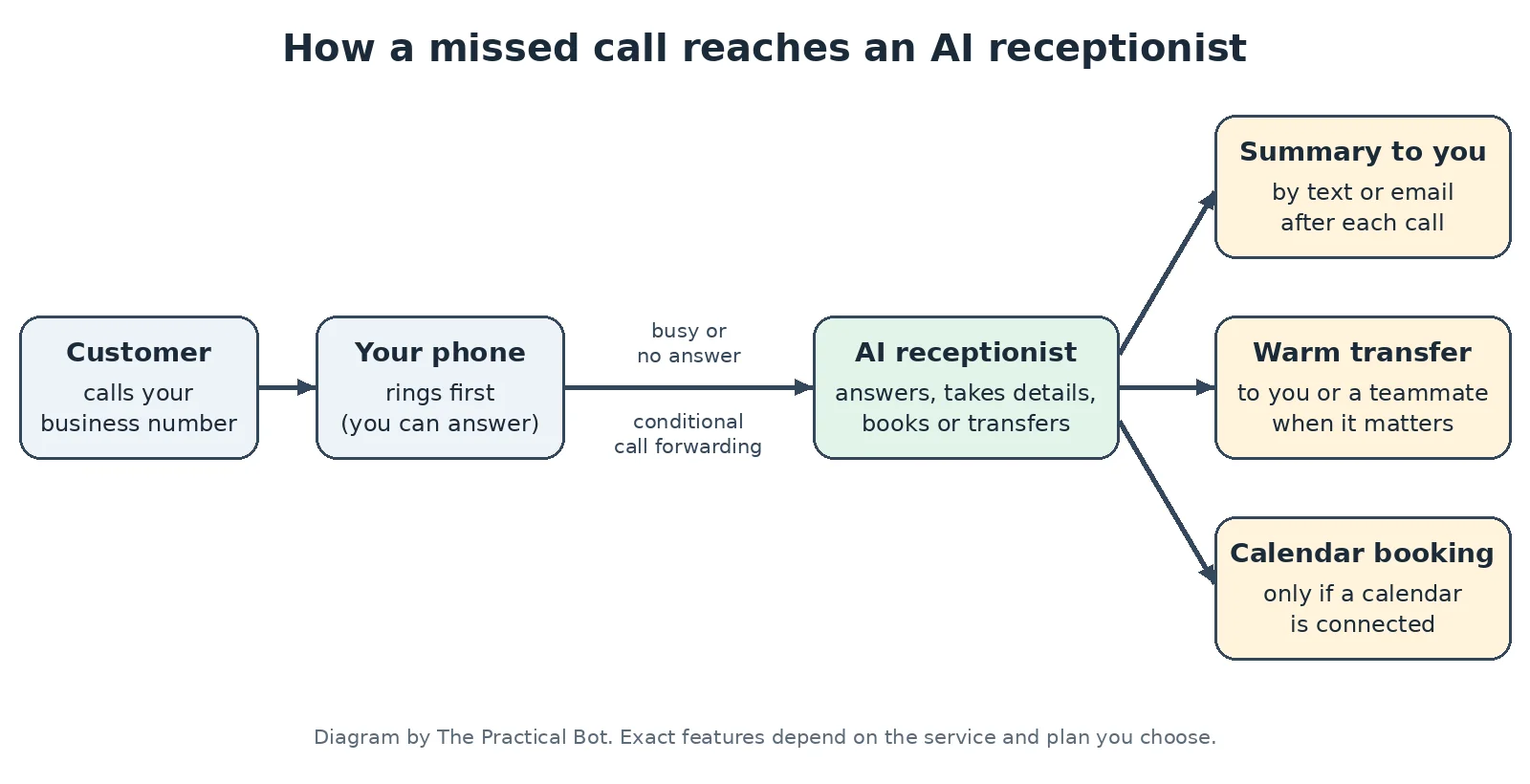 Diagram by The Practical Bot (own work).
It answers questions from what you teach it
Most services build a first version of your receptionist from your website, and some also read your Google Business Profile. RingCentral, for example, lists “Auto-setup: Website or Google Business Profile” on its pricing page, and Rosie says it scans your Google profile and website. That’s convenient, but it means wrong hours or an old price list on your website become wrong answers on the phone. You then add your own FAQs, rules and things it should never promise.
It takes messages and books appointments, if it’s connected
Every service takes a message. Booking is different: the receptionist can only put a caller in your calendar if a calendar is actually connected, and on some services that is only on higher plans. Rosie’s $49 plan sends callers a booking link by text, while booking directly on your calendar starts on its $149 Scale plan. Dialzara lists Google and Outlook calendar sync from its $99 Pro plan. Upfirst includes appointment scheduling on every plan.
It transfers to a person and sends you a summary
When a caller needs you, the receptionist can pass the call on. A “warm” transfer means it briefs the person before connecting the caller; a “blind” transfer just connects. Plans differ here too: Dialzara’s cheapest plan has blind transfers only, with warm transfers from Pro (pricing). After each call, you typically get a summary, and usually a recording and transcript.
How AI receptionists charge you
This is where most of the confusion comes from. Vendors bill in four different ways:
| Billing model | You pay for | Examples | Watch out for |
|---|---|---|---|
| Per minute | Talk time | Rosie, RingCentral, Dialzara, My AI Front Desk | Long calls cost more; check the overage rate and how calls are rounded |
| Per call | Each answered call | Upfirst, Smith.ai | Short calls cost the same as long ones; check which calls are free (spam, hang-ups) |
| Per unique caller | Each different phone number, once a month | Goodcall | A plan minimum even in quiet months |
| Credits or conversations | A bundle of usage | Quo (Sona), Jobber Receptionist | Usually needs that company’s phone or business software plan too |
Here is what each service publishes for its entry plan. All prices are monthly billing, in US dollars, checked on each vendor’s own page on November 29, 2026. Annual billing is cheaper at several of them.
| Service | Billed by | Entry plan | Included | Over the limit | Free way to try |
|---|---|---|---|---|---|
| Upfirst | Call | $24.95 | 30 calls | $1.50 per extra call on Starter | 14 days or 100 calls, no card |
| Smith.ai | Call | $0 (Free) | 25 calls | $3.00 per extra call on Free; Pro is $150 for 75 calls | Free plan |
| Goodcall | Unique caller | $79 (Starter) | 100 different callers | 79 cents per extra caller | Free demo agent until you connect a number |
| Rosie | Minute | $49 (Professional) | 250 minutes | Not shown on the pricing page | 7 days |
| RingCentral AI Receptionist | Minute | $49 standalone, or $39 added to a RingEX phone plan | 100 minutes | $0.50 a minute, rounded up in 30-second steps | 14 days |
| Dialzara | Minute | $29 (Business Lite) | 60 minutes | $0.48 a minute on Lite | 7 days |
| My AI Front Desk | Minute | $99 (Business-in-a-Box) | 200 minutes plus $10 of overage credits | $0.25 a minute in credits | 7 days; also a Free plan with limited usage (billing guide) |
| Quo Sona | Credits (1 call = 100) | $0 add-on, but needs a paid Quo plan (from $19 a user, Quo pricing) | About 10 calls | $1.00 a call on the free tier; paid tiers from $25 for about 40 calls | Not counted here |
| Jobber Receptionist | Conversation | $99 add-on on Core, Connect or Grow (included on Plus) | 100 conversations (unlimited on Plus) | $0.79 per extra conversation on the add-on | Not counted here |
Two things the table can’t show. First, what happens at the limit: Quo’s Sona and Jobber’s Receptionist can stop answering when you run out instead of billing more (Sona sends calls to your fallback path, and overages are off by default; Jobber lets you choose to pay overages or pause). Second, which calls count: Upfirst doesn’t bill spam, calls under 15 seconds, or calls where the caller never speaks (pricing FAQ); Quo doesn’t charge for Sona calls under 15 seconds; Smith.ai filters known spam numbers and lets you remove up to 10% of calls from your bill as spam (FAQ).
Worked example: what 30, 100 or 300 calls a month would cost
To compare like with like, we priced the same three call volumes on every service, using only the prices above. Our assumptions: every call lasts 2.5 minutes, every caller is a different person, and you pick the cheapest published plan (including overage) for that volume. Your real numbers will differ, so treat these as estimates.
| Service | 30 calls (75 min) | 100 calls (250 min) | 300 calls (750 min) |
|---|---|---|---|
| Upfirst | $24.95 (Starter) | $69.95 (Premium, 90 calls + 10 at $1) | $159.95 (Pro) |
| Smith.ai | $15 (Free, 25 + 5 at $3) | $212.50 (Pro 75 + 25 at $2.50) | $500 (Pro 300) |
| Goodcall | $79 (Starter) | $79 (Starter) | $129 (Growth) |
| Rosie | $49 (Professional) | $49 (Professional, exactly at its 250-minute limit) | $149 (Scale) |
| RingCentral (standalone) | $49 | $124 (100 min + 150 at $0.50) | $374 (100 min + 650 at $0.50) |
| Dialzara | $36.20 (Lite, 60 min + 15 at $0.48) | $112.50 (Pro, 220 min + 30 at $0.45) | $299 (Plus, $199 + 250 min at $0.40) |
| My AI Front Desk | $99 | $101.50 (200 min + 40 free credit minutes + 10 at $0.25) | $226.50 (200 min + 40 free + 510 at $0.25) |
| Quo Sona (plus Quo Starter at $19) | $39 ($19 + 20 extra calls at $1, overages turned on) | $68 ($19 + $49 tier) | $145.50 ($19 + $99 tier + 50 at $0.55) |
| Jobber Receptionist (plus your Jobber plan) | $99 | $99 | $257 (100 + 200 at $0.79) |
How to read this:
- The cheapest plan isn’t always the one you need. At 100 calls, Rosie’s $49 plan fits only if every month stays under 250 minutes, and it sends booking links rather than booking on your calendar. Dialzara’s cheapest plan at 30 calls (Lite) has no calendar sync or warm transfers. Check the features you need, then price that plan.
- Add-ons have their own requirements. Quo lists call transfers on its Business plan ($33 a user, monthly), not Starter (Quo pricing), and Jobber’s $99 add-on is on top of Core, Connect or Grow (Receptionist is included with unlimited conversations on Plus).
- Repeat callers favor Goodcall’s model. If the same customer calls back three times in a month, Goodcall counts them once (pricing); our table assumes every caller is new, which is the most it would cost.
- Long calls favor per-call and per-caller billing. If your calls run five minutes, double the per-minute figures; the per-call and per-caller ones don’t change.
To run your own numbers: look at last month’s call log, count calls (and different callers), estimate the average length, then do the same math for the two or three services that have the features you need. Our AI receptionist cost calculator walks through this step by step, with a fill-in worksheet.
Do you actually need one?
Not every business does. An AI receptionist earns its keep when missed calls are expensive and frequent. A rough way to decide:
| Your situation | Likely answer |
|---|---|
| You miss calls most days, and one missed job is worth far more than a month of the service | Worth a trial |
| Many calls come after hours, and some are urgent (leaks, lockouts, no heat) | Worth a trial, set to after-hours and overflow only |
| Callers mostly want to book, and you already use an online calendar | Worth a trial on a plan that books on your calendar |
| You get a few calls a week and can call back within the hour | Probably not yet: voicemail transcription and quick callbacks may be enough |
| Most calls need judgment, quotes or sensitive conversations | A human answering service, or AI with human backup, may fit better |
Before paying anything, there are cheaper fixes worth trying: make sure your hours and services are right on your website and Google Business Profile, put a booking link where customers look for your number, and record a voicemail greeting that says when you’ll call back. We cover these, with a break-even worksheet, in do you need an AI receptionist? Free fixes to try first, and how AI compares with a human service in AI receptionist vs answering service vs voicemail.
Honest pros and cons
| Pros | Cons |
|---|---|
| Answers at any hour, and several services (Upfirst and Rosie, for example) say they handle multiple calls at once | Can give wrong or made-up answers, including fake bookings |
| Entry prices are low enough to try on a small budget, and some services have free plans or trials | Some callers dislike talking to AI and hang up |
| You get a written summary of every call | Needs setup and ongoing checking, not set-and-forget |
| You can start with only the calls you miss | Prices and features change often, and billing units are hard to compare |
How to set one up without changing your number
Most of the services we checked give you a new number and ask you to forward calls to it, so customers keep dialing the number they already know. Upfirst and Rosie, for example, both say you can keep your existing number by forwarding (Upfirst, Rosie).
- Pick which calls it should answer. Start with overflow and after-hours only, so your phone still rings first and the AI takes what you miss. Rosie, for example, supports after-hours and overflow-only through conditional call forwarding. Moving all calls over can come later.
- Turn on conditional call forwarding with your carrier. On Verizon, you dial
*71followed by the 10-digit number; calls then forward when you’re busy or don’t answer after 3 to 6 rings (Verizon support). On an iPhone, turn off Live Voicemail first, or*71won’t work (Verizon). Other carriers use different steps: AT&T says forwarding can only be changed from the phone itself, and that forwarded calls are billed for their length (AT&T support). Check your carrier’s own help page, or ask the AI receptionist’s support team, before you start. Our guide to forwarding missed calls to an AI receptionist has the codes and menus for each carrier and phone. - Teach it your business. Let it read your website, then correct and add: hours, service area, services and what you don’t do, how you handle prices, when to transfer, and a short list of things it must never promise. Our AI receptionist setup script template lists what to include.
- Connect your calendar only if you want bookings, and only on a plan that books directly. Otherwise, tell it to take a message or send a booking link.
- Set your limits. Decide what happens when you hit your plan’s limit (pay overage or pause), and who gets alerts.
- Test it before customers hear it. Call it yourself: ask your five most common questions, try to book, ask for a person, call after hours, and act like an unhappy customer. Then read the summary you’d receive. Our 12-call test script covers this in full.
- Review transcripts every week for the first month, and fix any answer it got wrong.
Risks and rules to know
Wrong answers and fake bookings
AI receptionists can sound sure and still be wrong. An independent price-comparison site that places scripted test calls reported that in 51 recorded calls to six AI receptionists, eight included something that didn’t match its test setup; six of those eight were the receptionist telling the caller an appointment was booked when no calendar was connected and no booking was made (AI Receptionist Pricing). That’s a small sample, as the site says, and it earns affiliate commissions from some providers, which it discloses. The lesson still holds: if it can’t book, tell it not to say it did, and test that.
You’re also responsible for what your bot tells customers. In a 2024 Canadian small-claims case about a website chatbot (not a phone line), Air Canada argued it couldn’t be held liable for what its chatbot said. The tribunal disagreed, writing that “it should be obvious to Air Canada that it is responsible for all the information on its website,” and ordered it to pay the customer (Moffatt v. Air Canada, 2024 BCCRT 149). Treat what your AI receptionist says the same way. More on avoiding this in our guide to common AI receptionist mistakes.
Recording calls and telling callers it’s AI
Most AI receptionists record and transcribe calls. Recording laws vary: federal law and many states allow recording when one party consents, but other states require that everyone on the call consents, and when callers are in a different state it can be hard to say which law applies (Digital Media Law Project). The simple, safe habit is a greeting that says the call is answered by an AI assistant and may be recorded. This is general information, not legal advice; check your state’s rules or ask a lawyer. Our call recording and disclosure guide goes further, with greeting wording to copy.
If you want the AI to make outbound calls, such as callbacks or reminders, a different rule applies. In 2024 the FCC confirmed that the TCPA’s limits on “artificial or prerecorded voice” calls cover AI-generated voices, so those calls need the called person’s prior express consent (FCC ruling FCC-24-17).
Health information and HIPAA
If you’re a dental, medical or therapy practice and callers may share patient information, the AI receptionist company is likely a “business associate” under HIPAA, which means you need a business associate agreement (BAA) with it before it handles that information (HHS guidance). Not every plan offers one: Goodcall says it signs a BAA on its $299 Scale plan and Enterprise, and Upfirst lists BAAs under its Enterprise plan. RingCentral lists HIPAA compliance as included in its AI Receptionist plan; ask any vendor for the BAA itself before you go live. Our HIPAA checklist for AI receptionists lists the questions to ask.
Which kind fits your business
- Already on a business phone system or field-service app? Check its add-on first. RingCentral, Quo and Jobber all sell one, and an add-on keeps calls, texts and customer records in one place. We compare them in RingCentral, Quo or Jobber: AI receptionist add-ons compared.
- Want a standalone service that works with any phone? Compare per-call, per-caller and per-minute services at your own volume, as in the table above. Our side-by-side of Smith.ai, Goodcall and Upfirst goes deeper.
- By type of business: trades with after-hours emergencies, salons and barbers who can’t answer mid-appointment, and medical offices with HIPAA duties each need different setups, and each has its own guide.
Checklist before it answers real customers
- Website and Google Business Profile show the right hours, services and service area
- It only answers the calls you chose (after hours, overflow or all)
- A calendar is connected before it is allowed to say a caller is booked
- Transfers to a person were tested, including when nobody picks up
- The greeting says it’s an AI assistant and that calls may be recorded
- You’ve checked your state’s call-recording rules
- A BAA is signed if callers may share health information
- You’ve chosen what happens at your plan’s limit (pay overage or pause)
- Someone reads the call summaries and transcripts every week
FAQ
How much does an AI receptionist cost? The cheapest published options among the services we checked run from free (Smith.ai’s 25-call plan) to $99 a month. In our worked example, 100 calls a month came to roughly $49 to $212.50, depending on the service. Always price your own call volume and the plan with the features you need.
Can I keep my business phone number? Usually, yes. Most of the services we checked give you a number to forward calls to, so callers keep dialing your existing number. Some, such as Upfirst, will also help you move (port) your number.
Will callers know they’re talking to AI? Many will, and it’s better to say so in the greeting. It sets expectations and covers you if calls are recorded.
Do spam calls count toward my bill? It depends on the service. Upfirst says spam and very short calls aren’t billed, Goodcall doesn’t count spam or wrong numbers, and Smith.ai filters known spammers and lets you remove up to 10% of calls as spam. Check the FAQ of the service you’re considering.
Is an AI receptionist better than a human answering service? AI is available at any hour and usually starts cheaper, but a person handles judgment calls and upset callers better. Some services mix the two: Smith.ai, for example, can transfer complex calls to its live receptionists. Compare both in our guide to AI receptionist vs answering service.
How long does setup take? Vendors describe a first version built from your website in minutes (RingCentral says “Set up in minutes” on its pricing page). Plan on longer: a few days of test calls and fixes before you let it answer real customers.
Related guides
Where to go next depends on where you are:
- Still deciding? Count your missed calls and work out a break-even number with do you need an AI receptionist?, then price your own call volume with the cost calculator.
- Ready to try one? Write its instructions with the setup script template, run the 12-call test script during the trial, and only then forward your missed calls to it.
- Comparing options? See AI vs a human answering service, Smith.ai vs Goodcall vs Upfirst, and the RingCentral, Quo and Jobber add-ons.