Forwarding takes one dial code or one settings screen. The part that goes wrong is making it forward only the calls you miss, without your phone’s own voicemail grabbing them first. This guide covers both for US carriers, using each carrier’s and phone maker’s own instructions (checked November 29, 2026).
You don’t need a new number. Services such as Upfirst and Rosie give you a number to forward to, so customers keep dialing the one on your van and your Google listing. New to the idea? Start with our guide to AI receptionists for small business.
The short answer
- Get the forwarding number from your AI receptionist’s dashboard.
- Pick the mode: overflow (your phone rings first) is the safest start.
- Turn it on:
- Verizon: dial
*71plus the 10-digit number. iPhone owners must turn off Live Voicemail. - T-Mobile: dial
**61*1plus the 10-digit number, then#. - AT&T: use your phone’s call forwarding menu; AT&T says forwarding can only be changed from the phone.
- Business phone system (VoIP): set “missed calls” to forward to an external number in your call-handling rules.
- Verizon: dial
- Test it with four calls from a second phone (table below).
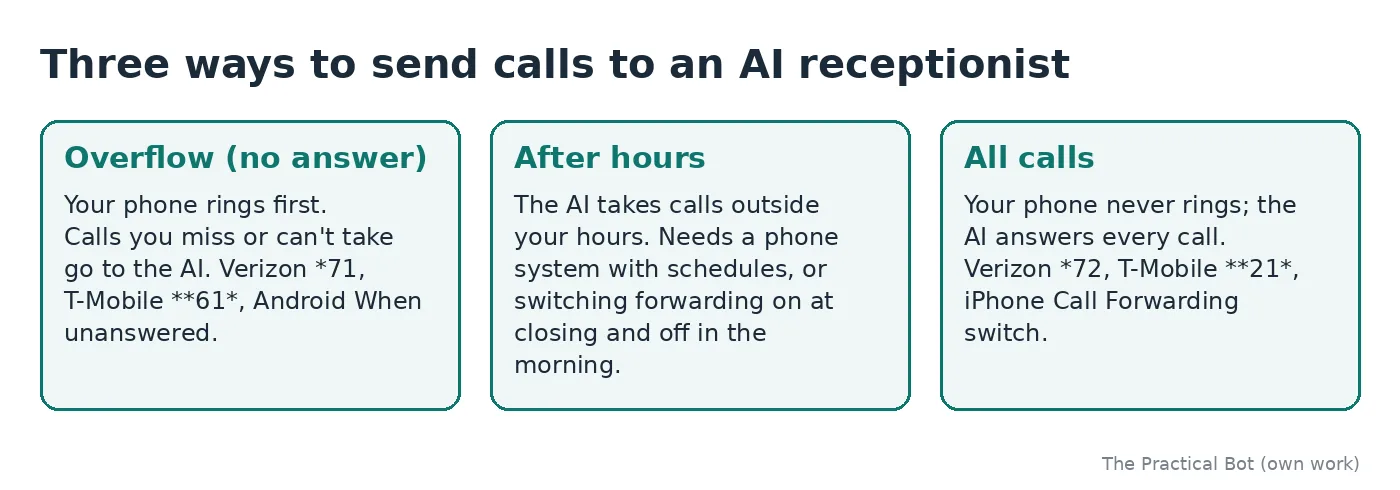
Pick the mode first
 Graphic by The Practical Bot (own work).
| Mode | Good for | Watch out for |
|---|---|---|
| Overflow (no answer, busy, unreachable) | Solo owners who answer when they can | The ring time before it forwards; on Verizon it’s 3 to 6 rings and you can’t change it |
| After hours only | Offices with set hours | Mobile carrier codes have no schedule. You need a phone system with hour-based rules, or you switch forwarding on at closing and off in the morning |
| All calls | Busy front desks, or when you’re away for a day | Your phone never rings, so every caller gets the AI |
Rosie, for example, says it can answer only after hours or overflow calls through conditional call forwarding (Rosie). Overflow left on around the clock is the simplest version: during the day you answer what you can, and at night every call goes unanswered and forwards anyway.
Verizon
Verizon’s codes, from its support page:
| What | Dial |
|---|---|
| Forward calls you don’t answer, or when you’re busy | *71 + 10-digit number (for example *71 999 555 4567) |
| Forward every call | *72 + 10-digit number |
| Turn forwarding off | *73 (Verizon FAQ) |
After you dial, listen for beeps and wait for the call to end on its own. With *71, calls forward when you’re busy or haven’t answered after 3 to 6 rings. If the code doesn’t work, Verizon says to contact customer service.
iPhone on Verizon: turn off Live Voicemail first. Verizon says Live Voicemail is on by default on iPhones and must be turned off to use Conditional Call Forwarding (*71) (Verizon). Go to Settings, Apps, Phone, Live Voicemail and turn the switch off. If you skip this, your iPhone takes the missed call as a voicemail and the AI never hears it ring.
T-Mobile
T-Mobile lists these codes on its short codes page. Type a 1 and then the 10-digit number where it says number.
| What | Turn on | Turn off |
|---|---|---|
| No reply (calls you don’t answer) | **61*1 + number + # | ##61# |
| Not reachable (phone off or no signal) | **62*1 + number + # | ##62# |
| Busy | **67*1 + number + # | ##67# |
| All calls | **21*1 + number + # | ##21# |
| Reset all forwarding | ##004# |
For overflow, set up all three conditional codes (no reply, not reachable and busy). **62* alone only covers a phone that’s off or out of signal; calls you simply let ring still go to voicemail.
You can choose how long it rings. T-Mobile lets you set the no-reply delay to 5, 10, 15 and up to 30 seconds by adding ** and the seconds before the #, for example **61*15551234567**15# for 15 seconds. Pick a delay long enough to grab the phone from your pocket but shorter than your voicemail pickup.
T-Mobile notes that short codes are delivered to the primary SIM and that some features differ on select plans, and that you can only forward to 10- or 11-digit numbers (calling services).
AT&T
AT&T says forwarding “can only” be changed from your wireless phone, not online, and points customers to its device tutorials (AT&T). AT&T’s support pages don’t list conditional dial codes, so use your phone’s menu:
- Android: see the Android steps below. AT&T’s own Pixel guide lists When busy, When unanswered and When unreachable (AT&T device support).
- iPhone: the iPhone’s Call Forwarding switch forwards calls, and Apple says to contact your carrier for conditional forwarding when busy or not in service (Apple). Ask AT&T, or your AI receptionist’s support team, how to forward only unanswered calls on your line.
Three things AT&T says that apply to any carrier: forwarding overrides your wireless voicemail, a busy forwarding number gives your callers a busy signal, and forwarded calls are billed for their length and may add long-distance charges on some plans.
iPhone and Android menus
| Phone | Path | What it can do |
|---|---|---|
| iPhone | Settings, Apps, Phone, Call Forwarding, then Forward To (Apple) | Forwards calls; for busy or unanswered only, use your carrier’s method. Apple notes this needs a GSM network and cellular signal when you set it |
| Google Pixel | Phone app, Sidebar, Settings, Calling accounts, your SIM, Call forwarding (AT&T device support) | Always, When busy, When unanswered, When unreachable |
| Samsung Galaxy | Phone app, three dots, Settings, Supplementary services, Call forwarding (Samsung) | Always forward, Forward when busy, Forward when unanswered, Forward when unreachable |
Samsung notes that availability varies by carrier and phone model. On Android, turn on all three conditional options for overflow, not just “unanswered”.
One safety note from Apple: iPhone blocks links in messages or emails that ask you to turn on call forwarding, because scammers use them. Only set forwarding to a number you copied from your AI receptionist’s own dashboard.
Business phone systems (VoIP)
If your business number lives in a phone system rather than on a cellphone, forwarding is a rule, and you can usually give it a schedule. In the RingCentral app, for example, go to Settings, Phone, Call handling, set your work hours, then under Missed calls choose Forward to external number (RingCentral Support). You can set different rules for work hours and after hours, which is how you get a true after-hours-only setup.
Some phone systems sell their own AI receptionist, which skips forwarding entirely. We compare RingCentral, Quo and Jobber’s add-ons in a separate guide.
Test it with four calls
Use a second phone. You can’t test forwarding by calling your own number from the same phone.
| Test | Do this | You should see |
|---|---|---|
| Answered | Call and pick up | You get the call |
| No answer | Call and let it ring | After the ring time, the AI answers, not your voicemail |
| Busy | Call while you’re already on another call | The AI answers (on T-Mobile, the busy code covers a call arriving while you dial out) |
| Unreachable | Turn on airplane mode, then call | The AI answers, if you set an unreachable rule (T-Mobile **62*, Android When unreachable) |
Then check the AI receptionist’s dashboard: every test call should show up with a summary. Our test-call checklist covers what to ask it once calls are arriving.
When it doesn’t forward
| Symptom | Likely cause | Fix |
|---|---|---|
| Missed calls still go to your voicemail (Verizon, iPhone) | Live Voicemail is on | Settings, Apps, Phone, Live Voicemail: off |
| Unanswered calls go to voicemail (T-Mobile) | Only **62* (unreachable) is set | Add **61* and **67* |
| Voicemail picks up before forwarding (T-Mobile) | Delay longer than voicemail pickup | Set a shorter delay, for example 15 seconds |
| Callers hear a busy signal | The forwarding number is busy | Check the AI service is active, then contact its support |
| Code gives an error | Typo, a plan that doesn’t support it, or no signal | Re-dial carefully with signal; Verizon says to contact customer service if *71 or *72 doesn’t work |
| Your phone never rings | You set “all calls” (*72, **21*, or the iPhone switch) | Turn that off (*73, ##21#, or the switch) and set conditional forwarding |
Checklist
- Forwarding number copied from the AI receptionist’s dashboard
- Mode chosen: overflow, after hours or all calls
- iPhone on Verizon: Live Voicemail turned off
- T-Mobile or Android: all three conditional options set, not just one
- T-Mobile: ring delay set shorter than voicemail pickup
- Four test calls made from another phone, and all four show in the dashboard
- You know how to switch it off (
*73,##004#, or the menu)
FAQ
Do I lose my number if I use an AI receptionist? No. Forwarding keeps your number. Some services also offer to move (port) your number to them, which is a bigger change; forwarding is easier to undo.
Can I forward only after-hours calls from a cellphone? Not with a schedule from the carrier’s codes. Either leave overflow forwarding on all the time, so unanswered calls at night forward anyway, or switch all-call forwarding on when you close and off when you open. A business phone system with hour-based rules does this automatically.
Does forwarding cost extra? It can. AT&T says forwarded calls are billed for their length and may carry long-distance charges, though some plans don’t count them against included minutes. Check your own plan, and remember the AI service bills too: our cost calculator shows how to price that side.
Will callers know the call was forwarded? They dial your number and hear the AI receptionist’s greeting. Make that greeting say it’s an AI assistant; our setup script template has the wording.
How do I turn it off?
Verizon: *73. T-Mobile: ##004# resets all forwarding. On iPhone or Android, switch it off in the same menu.